A local real estate agency attracted negative attention recently after a blog posted to its website and Facebook went viral. The post was seen as being misogynistic and sexist and resulted in the agency being slammed by many in the local community and around the country when the story was picked up by the media. The agency apologised for the post when it became aware of it and explained that they engaged a real estate marketing agency to write content for their website.
More and more businesses are seeking out the services of bloggers (or Ghostwriters) to write their content in the hope that it will increase their search ranking and social media footprint. It is widely known that regular, relevant and quality updates to your website can help improve its search rank.
In this case, the blog post went against two of my fundamental rules for improving websites – it was not original (it appeared on as many as 18 other websites according to one news agency) and it was poorly written, littered with grammatical errors – two things which will lower your search rank! Were you paying for them to lower your rank?
Even if you have a Ghostwriter writing for your site, you can protect yourself by not allowing them to publish content themselves. You should check all posts and only publish them if you are happy with the content. Your website is attributed to your business and conveys your message so it’s your reputation on the line.
https://ctech.au/wp-content/uploads/2021/02/Ghostwriter.jpg12001466adminhttp://ctech.au/wp-content/uploads/2022/12/weblogo-3-300x96.pngadmin2021-02-05 10:55:002022-09-06 21:16:44The risk of using Ghostwriters for your blog
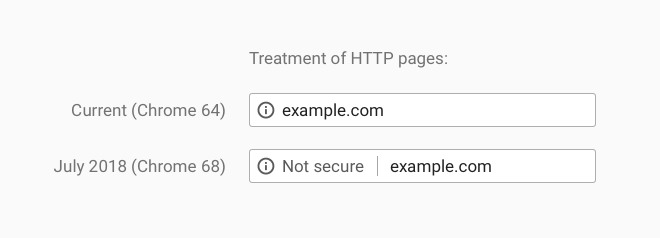
Google has announced that when version 68 of its Chrome web browser launches in July, it will mark sites all sites that do not use encryption as ‘not secure’. The move is the next step in Google’s push for all websites to adopt encryption (also known as HTTPS). Over time, Google has been progressively marking more sites as not secure – with it now displaying that sites requesting passwords or credit card information or running in Chrome’s Incognito mode over an unencrypted HTTP connection as insecure.
From July, Chrome will display that any website using plain HTTP as being ‘not secure’. Source: Google
When a user loads a website over plain HTTP – the data flowing between the user and the website is unencrypted and can be seen by anyone between the user’s device and the web server. This allows for information such as passwords to be eavesdropped and even for malicious material to be added to the data going back and forth.
When a site is connected to over HTTPS, the connection is encrypted end-to-end making it harder for someone to eavesdrop on your information.
When users load a website over plain HTTP, their connection to the site is not encrypted. Anyone between their device and the site can see the information going back and forth or change content before it gets to the user. This allows for passwords to be eavesdropped and malicious material to be added to the data going back and forth.
When using HTTPS, the connection is encypted end-to-end stopping anyone from eavesdropping on your information.
Technology called Secure Sockets Layer (SSL) is used to encrypt data being transmitted over the Internet. It is commonly used for web sites, email services and file transfer. When a user connects to a secured website, the web server and the user’s browser carry out a handshake. The server sends a certificate which the user’s browser verifies before negotiating a secure connection. The user’s browser and server exchange keys and an encrypted session begins. This is all done transparently with the user only knowing about it with the display of a padlock in their address bar.
Do I really need to move to HTTPS?
Whether you really need to move to HTTPS depends on how you think your visitors will react when Chrome (and other browsers will follow) shows that your website is “not secure”. HTTPS has also been a ranking factor with Google’s search for sometime, so to achieve the best search rank you will need to go secured.
E-commerce sites where you take orders and accept payments should already be using HTTPS with a certificate from a reputable certificate provider but if your website is just a way of advertising your products and services and a way for customers to contact you you may not be.
When moving to HTTPS, you can either use a free certification authority like LetsEncrypt! or obtain a paid certificate from a certification provider. Both will show as secured in your visitor’s browsers but a paid certificate often comes with an easily recognisable trust seal and last for a longer period. Our hosting will work with both types of certificates and can automate renewal and installation for LetsEncrypt while we can do the installation of a paid certificate.
If you are not sure which way to go, get in touch and we can point you in the right direction.
https://ctech.au/wp-content/uploads/2017/04/sslcers.jpg11561732adminhttp://ctech.au/wp-content/uploads/2022/12/weblogo-3-300x96.pngadmin2018-02-16 19:43:002021-01-02 21:40:04Will Chrome mark your website as ‘not secure’ from July?
The NSW Office of Fair Trading has issued a warning to businesses about signing up for Search Engine Optimisation (SEO) services without looking into the SEO provider first. Many of these services promise to get you on the first page of Google but often don’t deliver – charging hundreds or even thousands of dollars for the service.
Many SEO providers still use archaic methods which worked a few years ago but have little effect today. The algorithms behind search engines have gotten smarter and the old methods simply don’t achieve results now – metatags, automated random backlinks and rehashing content. Unfortunately many SEO providers still use these methods that haven’t worked since Google’s update in 2012.
Today, improving your search rank involves improving your content, ensuring keywords you want to be found under are in text not hidden in images, regularly updating your site and making use of blogs and social media to get your website out there. These are all activities which can be done for just a few hours a week without spending thousands on something which can’t realistically guarantee results.
http://ctech.au/wp-content/uploads/2022/12/weblogo-3-300x96.png00adminhttp://ctech.au/wp-content/uploads/2022/12/weblogo-3-300x96.pngadmin2014-02-02 17:00:032014-02-02 17:00:03NSW Fair Trading’s Warning on SEO
Most businesses understand that they need to keep the software on their computers up-to-date to ensure they are protected against security risks. Malware writers and hackers are constantly looking for vulnerabilities in software which allow them to attack computers. When vulnerabilities are discovered, software vendors will create patches to fix those issues.
Many businesses on the other hand don’t realise that often their website is powered by software called a Content Management System (such as WordPress, Drupal and Joomla). This software, like the software on your computer is often patched to fix security vulnerabilities.
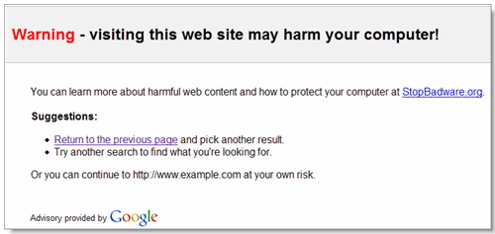
Security warnings like this can appear if your website is compromised.
Vulnerabilities in your website software can allow hackers to steal data, use your web server to send spam (and end up with you being placed on blocklists) and to deface websites. When hackers or malware take advantage of these vulnerabilities they may place viruses or other malware on your website which can infect visitors which can also lead to a security warning being placed on your search listing.
How many visitors are going to visit your website if they receive a warning that visiting your website may harm their computer? Not many.
Once a website is compromised it can be complicated to resolve, requiring the services of an expert. The best way to reduce the risk of your website being compromised is to keep your website software up to date. Don’t give malware authors and hackers the keys to your website, make it as hard as possible for them to compromise it.
Every business should know what web site software they are using (if any) and keep it up to date. If it’s managed by someone else – ask them how often they update the software.
http://ctech.au/wp-content/uploads/2022/12/weblogo-3-300x96.png00adminhttp://ctech.au/wp-content/uploads/2022/12/weblogo-3-300x96.pngadmin2013-12-18 18:49:182013-12-18 18:49:18Why you should keep your website software current

 algorithms behind search engines have gotten smarter and the old methods simply don’t achieve results now – metatags, automated random backlinks and rehashing content. Unfortunately many SEO providers still use these methods that haven’t worked since Google’s update in 2012.