
What every business can learn from the Toll cyber attack
The ransomware attack on global logistics giant Toll last month should be a wake up call for all businesses to take cyber security seriously. Toll at the time claimed that it had deliberately taken key systems offline in order to prevent the spread – requiring distribution centres to revert to manual processing, drivers issuing manual receipts and customers unable to book or track shipments online. The loss of key systems resulted in delivery delays and mass customer frustration.
Up to 1,000 of Toll’s servers were infected with a previously unseen variant of the Mailto (aka Kokoklock) ransomware which required servers to be manually cleaned up and restored – a very labour intensive task.
Due to the high-profile nature and widespread disruption caused by the Toll attack it received considerable attention and impacted many other businesses and customers. Unfortunately, Toll is not alone in being victim to cyber attack. In Telstra’s 2019 Security Report, were 320 Australian businesses were surveyed found that 65% of those had been impacted by a security breach in the past year and 89% believe that a breach may have gone undetected.
What every business should take away from the Toll attack is that attacks can happen to anyone and that cybersecurity is everybody’s concern.
How are cyber attacks carried out?
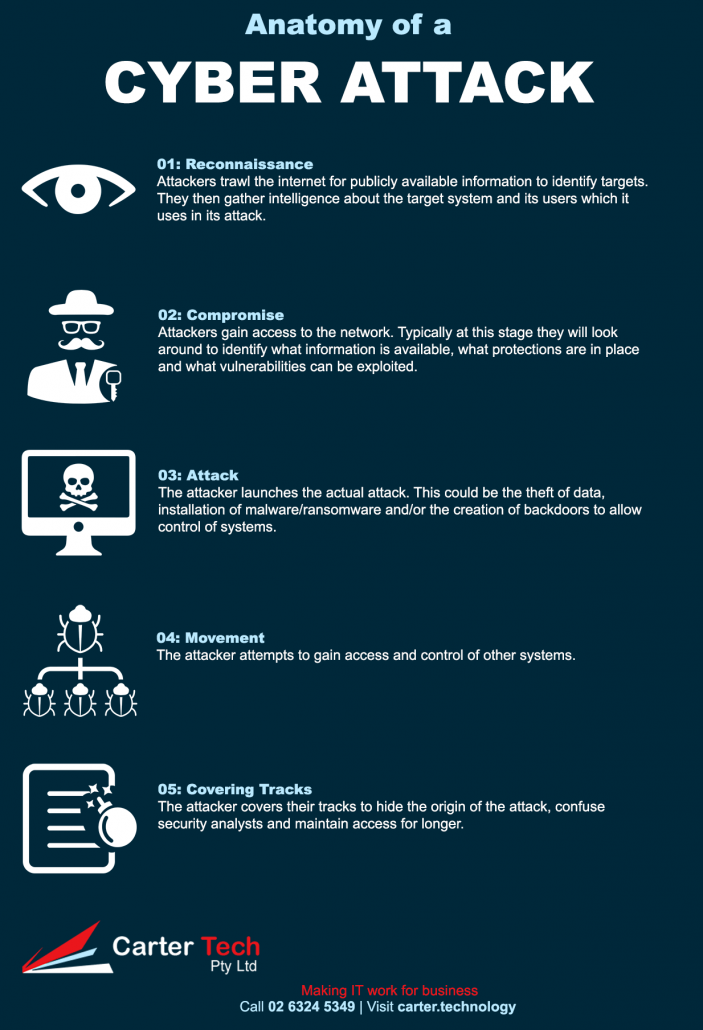
Reconnaissance
The first step in any cyber attack is reconnaissance. Attackers will trawl the Internet for publicly available information to find a target and will then gather intelligence on the target. Attackers will collect information on network addresses, domain names and network services. They will often scan the network for vulnerabilities and send phishing emails to staff to lure them into providing their credentials or installing an exploit. They will also search for email addresses of staff and send phishing emails to see if they can either lure a user to install an exploit or give up their credentials.
Compromise
Once the attacker is inside the network they will try to escalate their privileges and look around at what information is available, what protections are in place and what vulnerabilities can be exploited.
Attack
At this stage the attacker will carry out their actual attack. This might be the theft of data for sale on the Internet (or leaking to embarass the target), encryption of data for ransom or gaining control of systems to use in botnet attacks or cryptomining.
Movement
The attacker will then look for other systems to compromise and attack. Often the attacker will use these further systems to hide within the corporate environment even after being detected for future attack. Attackers may also use the system to infiltrate other targets.
Covering Tracks
Attackers cover their tracks to hide the origin of the attack and may safely place their exploit in the system to avoid getting detected and maintain access. The primary purpose is to confuse security analysts and throw them off the target. An attacker will use various tools and techniques to cover their tracks such as spoofing, log cleaning, zombie accounts and trojan commands.
Protecting against cyber attack
The greatest protection against cyber attack is to avoid having your systems compromised to begin with. If an attacker can’t get in they can’t attack your systems. You can reduce the risk of compromise by:
- Training users about cyber security – in particular phishing attempts;
- Patching security vulnerabilities in software;
- Only allowing outside access to services which need to be publicly accessible. Don’t allow external access to servers over Remote Desktop – use RD Gateway or VPN instead;
- Only granting administrative level privileges to those who really need it and ensuring that they don’t use it for general computer use (such as browsing the web and reading emails);
- Ensure data is only accessible by those who need it;
- Restrict which applications can run;
- Enforcing password security (not using dictionary words, requiring some complexity, password rotation);
- Use a good endpoint protection and/or threat protection application;
- Use a security applicance/firewall with the capability to detect and prevent intrusions (a good appliance will also inspect outgoing traffic which can help to mitigate attacks by detecting communication from within your system to an attacker if you get compromised); and
- Test the system for vulnerabilities and pre-emptively fix them.