
NSA discloses critical security flaw in Windows
The United States’ National Security Agency (NSA) isn’t typically forthcoming with information about security flaws in computer systems. In the past it has found vulnerabilities in Microsoft’s Windows Operating System and sought to exploit them as part of their digital espionage program. One such example of this was the Eternal Blue bug.
On Wednesday local time, the NSA announced that they had discovered a flaw with the way Windows verifies security certificates which could allow cyberattacks on up to 900 million PCs and servers across the globe. The vulnerability affects Windows 10 and Windows Server 2016/2019 as well as applications which use Windows for cryptographic verification. It allows an attacker to spoof security certificates allowing them to appear as though they are trusted, allowing malicious code to be executed on a device.
The NSA says that the vulnerability could affect:
- HTTPS connectionsons
- Signed files and emails
- Signed executable code launched as user-mode processes
Of particular concern is how the vulnerability can be exploited by malware authors to bypass Windows SmartScreen which alerts a user when a program they are trying to run comes from an unverified publisher. An attacker may sign an executable file with a spoofed certificate which would allow it to run unimpeded.
The vulnerability could also be issued for a web server that was not authorised and a web browser which uses Windows’ in-built cryptographic functions would not issue a warning, allowing attackers to decrypt, modify or inject data on connections without being detected.
The NSA says:
The vulnerability places Windows endpoints at risk to a broad range of exploitation vectors. NSA assesses the vulnerability to be severe and that sophisticated cyber actors will understand the underlying flaw very quickly…
Fortunately, the NSA didn’t announce the vulnerability until Microsoft had released a fix for it as part of it’s patch Tuesday updates for January 2020. It is recommended that patches be installed quickly to ensure systems don’t remain vulnerable. Serious malware attacks (such as WannaCry, NotPetya and HeartBleed) came about well after fixes were published by Microsoft and attacked systems which were left unpatched.
Fix
Given the potential for this vulnerability to allow software to appear as though it is legitimate, it’s particularly important to update as soon as possible. Microsoft has a list of updates for each edition of Windows on it’s Security Response Center website.
To install the update (or check if it is installed already) go to Windows Update which you can access from Settings –> Update & Security. If it’s not already showing as pending, click Check for Updates and see if it appears. If not it may already be installed.
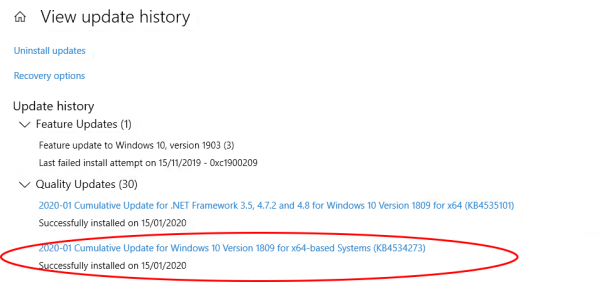
To check if it’s already installed from Windows Update, click the View update history link and see if “2020-10 Cumulative Update for Windows” is listed (or something similar). If it is you already have it. If you have recently upgraded to Windows 10 version 1903/09 you may have to check the version number of Windows as it was rolled into the updater. To do this, press and hold the Windows key and R then type winver in the box and hit OK. If the version shows as 18362.592 or 18363.592 you have the fix installed.


Leave a Reply
Want to join the discussion?Feel free to contribute!