
Protecting yourself against spoofing
Many businesses are heavily reliant on email today, due to the fast-paced and connected nature of the world we do business in. Unfortunately, many businesses never consider the security implications of using a system that was never designed with security in mind. Many people do not realise that the main protocols used by email were developed in the 1980s when networks connected to the Internet were owned by the military, educational institutions and the government. There was no reason to think that email being sent was being sent by anyone other than who it said it was sent by.
When an email is sent, it contains two separate sender addresses. There is an “envelope from” (sometimes called the return path) and the header from. The envelope from us the return address which is used by mail servers to return or bounce the message back to. It’s hidden in the email header which includes details used to understand who the message is from, where it has been and what software was used to write it.
All emails are sent with two sender addresses – the “envelope from” (sometimes called the return path) and the header from. The envelope from us the return address which is used by mail servers to return or bounce the message back to. It’s hidden in the email header which includes details used to understand who the message is from, where it has been and what software was used to write it.
The header from is the address visible to the recipient in their email client.
Its not at all difficult for a scammer to spoof either or both of these addresses to make it appear that their email is coming from somewhere other than where it did. Typically, spoof emails will impersonate someone the recipient trusts and uses this trust to get them to pay money into a bank account or to load malware onto their computer.
We were recently contacted by a company which had been subject to such an attack. The scammers had spoofed emails from the company’s accounts department and advised their customers that they had a new bank account and all payments had to be made to this account from a certain date. Some customers were also sent fake invoices which they paid.
Many of the company’s customers received legitimate invoices but paid the invoice into the scammers bank account due to the previous email about their bank details changing. The company estimates over $100,000 was paid into the wrong account.
When we looked at the DNS records for the company, we found that they hadn’t used any of the mitigation measures commonly used, despite having their email hosted in the cloud and set up by their usual managed service provider. While there is no guaranteed way to prevent email spoofing there are some technical solutions which can mitigate the risk of spoofing. These include the Sender Policy Framework (SPF), DomainKeys Identified Mail (DKIM), and Domain-based Message Authentication Reporting & Conformance (DMARC).
Sender Policy Framework (SPF)
The Sender Policy Framework works by providing a list of IP addresses which are authorised to send email for a domain. This IP list is stored in the DNS records of the domain as a TXT record. Email servers which have implemented SPF will lookup the DNS records for the domain that the email appears to come from and if it finds an SPF record in DNS it will compare the SPF record’s authorised IP address to that where the email is coming from.
If the IP addresses match, the email passes the test and should be from the domain it appears to be from. If it fails, then what happens depends upon the configuration of the recipient’s mail server. It may be rejected or marked as spam. The diagram below shows how a system uses SPF:
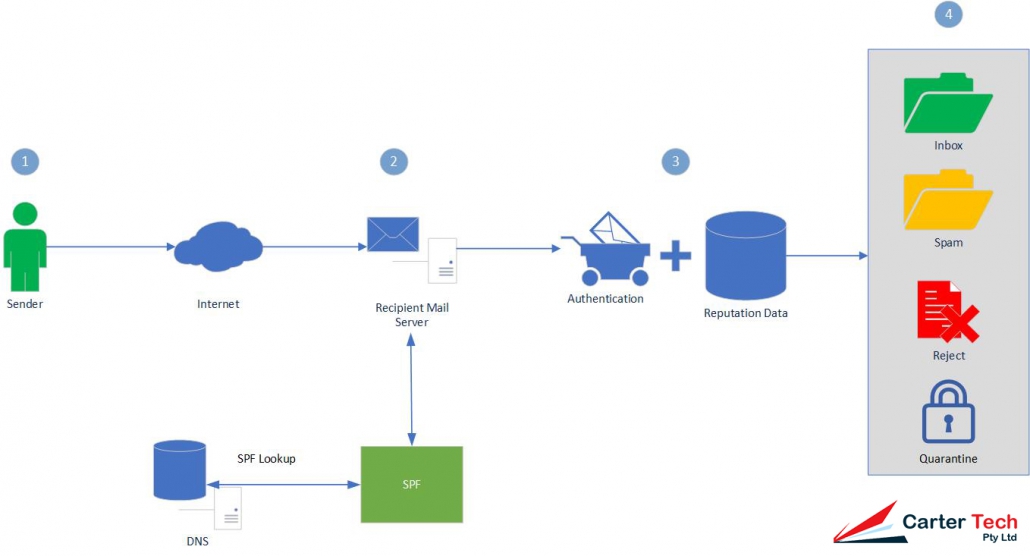
In the diagram you can see that a Sender (1) sends an Email using the Internet which is received by a Recipient Mail Server (2). The recipient server then looks up the SPF data in DNS and authenticates the Email as passing or failing SPF and adds reputation data to the Email header (3). Filters on the server will then decide what to do to with the Email (4) – which can include putting it in a user’s Inbox, Spam folder, rejecting the Email or Quarantining it.
SPF Records
SPF Records are recorded as TXT entries in DNS for your domain, they will look similar to:
v=spf1 a mx include:spf.mydomain.com.au ~allIn the above example:
- v=spf1 identifies that the TXT record is for SPF checking and uses version 1 of the SPF protocol
- a indicates that a sending IP matching any A record in the domain will pass (or AAAA record if the connection was made over IPv6)
- mx indicates that a sending IP matching the MX record of the domain will pass
- include: indicates that an IP address matching the rules specified in spf.mydomain.com.au will pass
- ~all indicates that all other IPs should soft fail (-all would hard fall all other IPs)
SPF Records consist of the SPF version details followed by mechanisms, qualifiers and (sometimes) modifiers.
Mechanisms and qualifiers
Mechanisms are evaluated from left to right with those at the left given greater priority than those to the right. Mechanisms are typically used with qualifiers such as:
| + | If the mechanism matches then pass. Mechanisms with no qualifier will be treated as passing (so +mx is the same as mx) |
| ? | For a neutral result (generally interpreted as nothing, that the address specified is neither authorised nor unauthorised to send messages on behalf of the domain) |
| ~ | Softfail. Typically used for debugging. Most servers will allow the message through but tag it. |
| – | Fail. The message should be rejected. |
Mechanisms define the mail servers which may send on behalf of the domain. They can be:
| all | Always matches. Typically used as the final mechanism with -all to block any addresses not matching those specified |
| a | If the domain name has an address record (either A or AAAA) that matches the sender’s address it will match. |
| ip4 | Tests whether the sender is in a given network. Can be an individual IP address (such as 10.1.1.1) or a network range given in CIDR notation (such as 10.1.1.0/24) |
| ip6 | Same as ip4 except using IPv6 addresses |
| mx | If the sender’s address matches an MX record for the domain it will match. |
| exists | If the sender’s domain name resolves to any address, match. Can also be used with SPF macros to create complex matches. |
| include | References another domain’s SPF rules. If the address matches the other domain’s rules the message will pass. This is typically used where the domain’s email is hosted elsewhere |
Modifiers
Modifiers allow for future extensions to the framework. Currently there are two modifiers defined:
| redirect | Redirects queries to another domain. Used where multiple domains are sharing the same infrastructure. Allows SPF records to be entered once and reused multiple times. |
| exp | Can provide an explanation for fail results by referencing a domain with a DNS TXT record using SPF’s macro language. |
Domain Keys Identified Mail (DKIM)
DKIM uses cryptography to verify that an email was sent from the domain it claims to come from. It provides a way for an organisation to take responsibility for sending a message that can be verified by the recipient’s mail server.
DKIM works by creating a hash value for one or more specified email header fields. A hash is a value created by a mathematical function against a string of readable text. For example if we have the following header fields:
From: nathan@carter.technology
Subject: DKIM Test
We can hash these (using MD5) to get a value of 6fb5cd149c1d966224f1e41d68c57985.
This hash value is then encrypted using a private key (which is reversible using a public key published in the domain’s DNS) which creates the signature to be added to the email. The signature is added to the email headers as the DKIM-Signature header. An example of which is:
DKIM-Signature: v=1; a=rsa-sha256; d=carter.technology; s=auseast; c=relaxed/simple; q=dns/txt; t=1117574938; x=1118006938; h=from:to:subject:date:keywords:keywords; bh=MTIzNDU2Nzg5MDEyMzQ1Njc4OTAxMjM0NTY3ODkwMTI=; b=dzdVyOfAKCdLXdJOc9G2q8LoXSlEniSbav+yuU4zGeeruD00lszZVoG4ZHRNiYzThe DKIM-SIgnature header is specified as tag-value pairs. In the above example:
- v= is the version of the signature specification. Always 1.
- a= is the algorithm used to sign the generate the signature. This should be rsa-sha256.
- d= is the domain whose DNS records will be used to get the public key
- s= is the selector where the public key can be obtained. In the example, the public key will be a TXT record under auseast._domainkey.carter.technology
- c= (optional) the canonicalization algorithm that defines what level of modifications may be present as the email is in transit to the mailbox provider. Modifications can include whitespace or line wrapping. Some email servers may make minor modifications to the email during transit (such as “Forwarded by….”) which can invalidate the signature. The first value is the algorithm for the header, the second for the body (for more detail, see here).
- q= (optional) the method to be used to retrieve the public key. Defaults to dns/txt if not specified.
- t= (optional) UNIX timestamp of when the signature was created
- x= (optional) UNIX timestamp representing when the signature expires
- h= a list of header fields used for signing in order from left to right, separated by colons.
- bh= hash of the body content of the email encoded in base64
- b= the signature encoded in base64 for the header fields identified in h=
The receiving mail server will use the selector and domain to look up the public key to decrypt the signature. This is obtained from a TXT record belonging to the resource (in the above example: auseast._domainkey.carter.technology). The TXT record is also specified in tag-value pairs, such as:
DKIM-Signature: v=1; a=rsa-sha256; d=carter.technology; s=auseast; c=relaxed/simple; q=dns/txt; t=1117574938; x=1118006938; h=from:to:subject:date:keywords:keywords; bh=MTIzNDU2Nzg5MDEyMzQ1Njc4OTAxMjM0NTY3ODkwMTI=; b=dzdVyOfAKCdLXdJOc9G2q8LoXSlEniSbav+yuU4zGeeruD00lszZVoG4ZHRNiYzIn the example:
- k= (optional) is the key type, typically rsa
- t= (optional) are optional flags. t=Y if the domain is testing DKIM (messages shouldn’t be treated differently to non-DKIM mail even if verification fails), t=s is for disallowing subdomaining
- p= is the public key to be used to decrypt the signature
Once the receiving mail server has the public key and signature, it will decrypt the signature and store it for comparison to it’s own hashing of the specified headers. If the hash matches the email is verified. If the hash doesn’t the email is not verified. The receiver will also check the hash of the body to check that the message hasn’t been altered in transport.
DKIM is harder to setup than SPF because it requires changes to your mail server. You can check if your mail system supports DKIM at DKIM.org’s site. If you use a mail provider you will need to work with them to make the changes.
Domain-based Message Authentication Reporting & Conformance (DMARC)
DMARC extends SPF and DKIM and allows the owner of a domain to publish a policy in their DNS records to specify whether DKIM, SPF or both is used when sending email from the domain, how to check the From: field shown to end users, how to deal with failures and how to report actions performed under those policies.
DMARC works in conjunction with SPF and DKIM and adds an additional check – the alignment check which ensures the header from address (the address shown to the user) matches the domain. It does this by comparing the header from to envelope from value used in the SPF check and the header from to the domain name given in the DKIM signature.
The diagram below shows how DMARC processes a message:
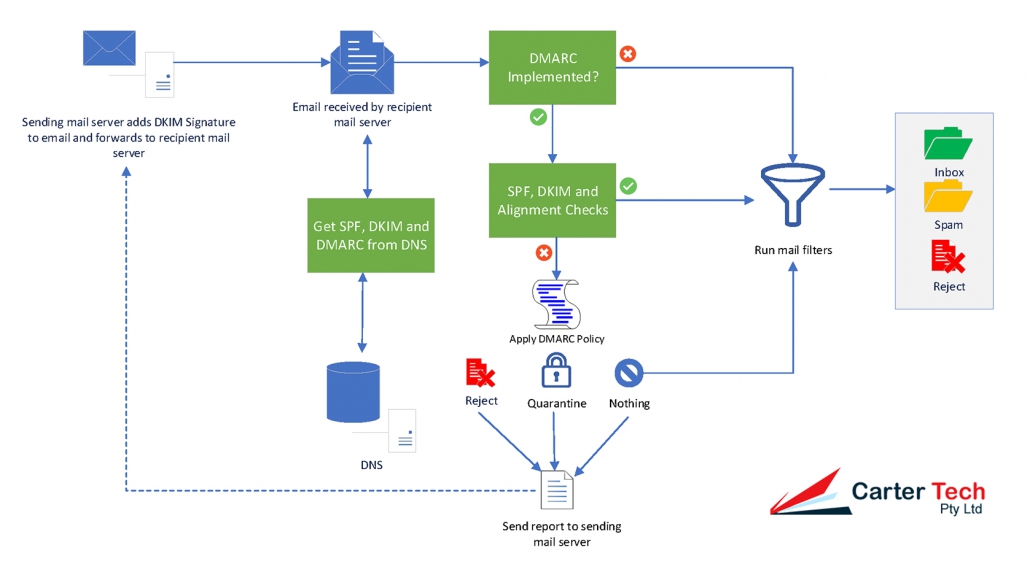
The reporting element of DMARC can provide two reports that are sent from a recipient mail server to a sending mail server:
- Aggregate reports: typically sent once per day in XML format and gives the IP addresses mail was received from with a count by disposition status (none, quarantine or reject), the DMARC domain identifier and the SPF and DKIM authentication results;
- Failure (or forensic) reports: sent almost immediately after a message fails DMARC checks and contains detailed information to help an email administrator can use it to investigate why the email failed authentication
DMARC Records
DMARC records follow the same tag-value syntax used by DKIM:
v=DMARC1;p=quarantine;pct=100;fo=1;rua=mailto:dmarcadmin@mydomain.com.auValid tags are:
- v= the version tag identifying the record as a DMARC record, it’s value must be DMARC1 and be at the beginning of the record;
- p= the policy you want mailbox providers to apply when your messages fail DMARC authentication and alignment checks. Unless an optional sp tag is given it applies to the primary domain (mydomain.com.au) and all subdomains (a.mydomain.com.au, x.mydomain.com.au). The available policies are none, quarantine or reject.
- rua= (optional) the URI to send aggregate reports to.
- fo= (optional) tells mailbox providers for which events you want to receive failure reports
- 0: Generate a failure report if both SPF and DKIM dail to produce an aligned pass result (default).
- 1: Generate a failure report if SPF or DKIM produced something other than an aligned pass result.
- d: Generate a failure report if the message had a DKIM signature which failed evaluation.
- s: Generate a failure report if the message failed SPF evaluation.
- sp= (optional) the policy which should apply to all subdomains.
- adkim= (optional) indicates whether DKIM must match the organisational domain (r – relaxed mode (default)) or must be identical (s – strict).
- aspf= (optional) indicates whether SPF must match the organisational domain (r – relaxed mode (default)) or must be identical (s – strict) .
- pct= (optional) indicates the percentage of messages from the domain the tests should be applied to. Can assist in implementing DMARC gradually. Requires a value between 0 and 100 (default). Where a number below 100 is used, the messages not subject to the test will be subjected to the next-lowest level test (so for 60 with a reject policy, 40% will be subjected to quarantine, for 60 with a quarantine policy, 40% will be subjected to nothing)
- ruf= (optional) the URI to send failure reports to.
- rf= (optional) indicates the format for message failure reports. At present the Authentication Failure Reporting Format (afrf) is the only value supported.
- ri= (optional) how often aggregate reports should be sent in seconds. Defaults to 86400 (one day).
We suggest implementing DMARC in stages. Starting with reporting only, then moving to quarantine then rejection. This way the reports from each stage can be reviewed and any issues ironed out before progressing to the next stage. The task of analysing your aggregate reports can also be made easier using various parsing tools or online services.
SPF, DKIM and DMARC are not Perfect
While SPF, DKIM and DMARC can cut down on the number of spoofed emails appearing to come from your domain they are not perfect because:
- A system in your environment may be compromised and sending email through your mail system;
- Many email hosts are not properly configured for one or more of the protocols and may ignore your settings or only respect part of your settings.
Ensuring your email system can interpret SPF, DKIM and DMARC can also help to cut down on the number of spoofed emails you receive but keep in mind that legitimate emails can sometimes fail the checks which may need you to apply less aggressive settings.